Self-hosted notes for small VPS setups

Field notes for running useful services without a big stack.

The articles here are written from the point of view of a small operator: one VPS, a few containers, nginx in front, and not much appetite for unnecessary moving parts. Each page tries to answer the practical questions that come up before a service becomes part of the regular maintenance list.

4 practical project guides
Static site architecture
nginx simple edge model
Compose deployment baseline
Featured projects

Projects that fit a modest host

See all projects
Low Node.js app in a single container

Uptime Kuma

A lightweight status and uptime dashboard for checks, alerts and quick operational visibility.

Small VPS
Works well on a 1 vCPU / 1 GB RAM VPS when checks stay modest.
Persistent data
Yes. Keep the application data directory on a named volume.
Read deployment notes
Low PHP application with SQLite or MariaDB

FreshRSS

A web RSS reader that stays practical on a small VPS and keeps feed reading separate from larger platforms.

Small VPS
A good fit for a 1 vCPU / 1 GB RAM VPS with modest feed counts.
Persistent data
Yes. Preserve config, extensions and feed data.
Read deployment notes
Low Django application with SQLite or PostgreSQL

Linkding

A compact bookmark manager for saving references, docs and articles without browser-sync sprawl.

Small VPS
Very comfortable on a small VPS and easy to keep isolated.
Persistent data
Yes. The database and uploaded assets should persist.
Read deployment notes
Moderate Single binary application with optional external database

Gitea

A lightweight Git forge for small teams that want repositories, issues and code review without a large footprint.

Small VPS
Reasonable on a 2 GB RAM VPS for modest traffic and a small user base.
Persistent data
Yes. Repositories, attachments and config must persist.
Read deployment notes
Baseline setup

A practical default for a small host.

  • Separate service directories so changes stay contained.
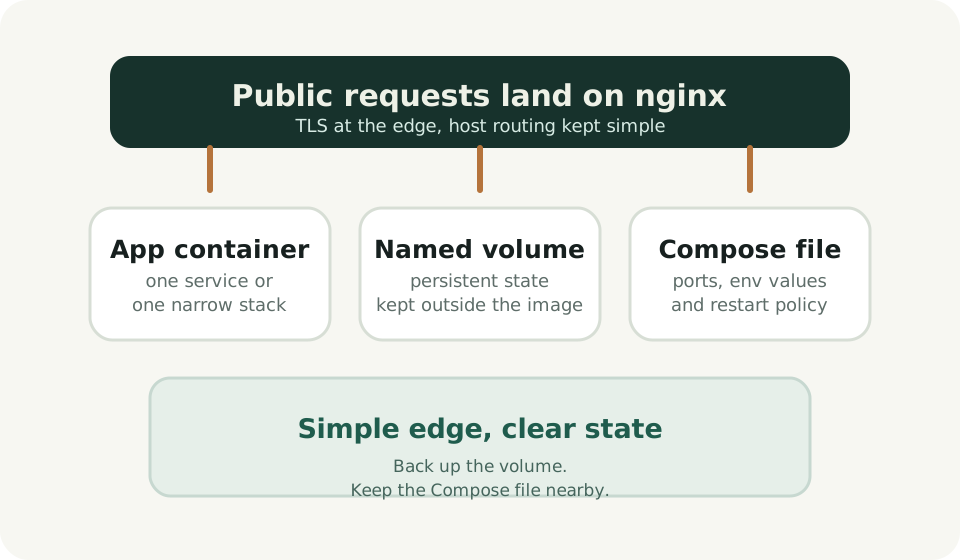
  • nginx at the edge and application containers on a private network.
  • Named volumes for state plus the Compose file that explains the deployment.
  • Updates done one service at a time, with a rollback plan before pulling images.
Simple stack diagram showing nginx, app container, named volume and Compose file.
Editorial scope

Between official docs and maintenance work.

Official documentation is still the source of truth for supported installation methods. The value here is in narrowing that material down to the tradeoffs a small host owner usually feels first: RAM pressure, storage layout, the difference between useful state and disposable containers, and what becomes annoying to maintain.

That is why the articles are short and opinionated instead of exhaustive.

Reading model

Read the project pages as deployment notes.

Each guide follows the same shape: what the service is for, when it fits, when it is the wrong tool, how to get it running with minimal ceremony, and what should be backed up before the first upgrade.

Formal affiliation and trademark notes are kept on the About / Disclaimer page.

Recent updates

Recent article edits

Full changelog

Expanded backup notes for FreshRSS and Gitea

Added more concrete guidance on which directories matter first when disk space is tight.

Simplified the homepage and project cards

Reduced copy length and made the small VPS signals easier to scan.

Added deployment patterns section

Documented a baseline folder layout, update flow and nginx setup for static, low-friction hosting.